Create / 2D sprites and pixel art
Pixel-art characters that walk, fight and ship.
Make a sprite from a sentence, animate it, and export a sprite sheet with frame data your engine reads. Every example on this page was made with these tools.
Free plan: 100 credits a month, enough for 5 Sprite Studio sprites or 10 Creature Forge creatures.
The pipeline
One sentence to a spell-casting mage, in four steps.
Each step is a different part of the toolset, and each output feeds the next. Total for this mage: 210 credits.
- 01 Describefree
"fire mage in red robes holding a glowing staff"
Pick character, monster, item, tile or effect, then size, view and look.
- 02 Sprite60 cr
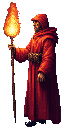
Sprite Studio draws it on a real pixel grid, 64 x 128, in the detailed look.
- 03 Animate150 cr
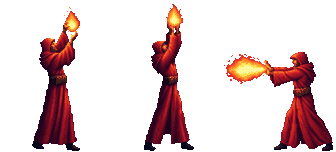
A 3-pose cast sequence from the same sprite: each pose checked, same palette.
- 04 Exportfree
mage/cast.png
mage/cast.json
3 frames, 112 x 152
foot pivot per frame
A PNG sheet plus Aseprite-format JSON. Phaser loads it with one line.
Examples, with recipes
Characters, creatures, props, tiles and effects.
Goblin merchant, walk
510 crSprite Studio sprite, then a walk cycle, 8 frames, 64 x 128
Fire mage, cast
210 crSprite Studio sprite, "fire mage in red robes holding a glowing staff", then a 3-pose cast sequence, 112 x 152
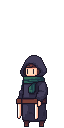
Hooded rogue
60 crSprite Studio, "hooded rogue with twin daggers and a dark green scarf", 64 x 128

Robot mechanic
60 crSprite Studio, "robot mechanic in orange overalls holding a big wrench", 64 x 128
Knight, attack
260 crSprite Studio attack sequence, 4 poses, 92 x 128
Emberback
10 crCreature Forge, reptile family, 5 animations in 8 directions
Glimmer Slime
10 crCreature Forge, slime family, 5 animations in 8 directions
Duskwing
10 crCreature Forge, winged family, 5 animations in 8 directions
Rustshell
10 crCreature Forge, bug family, 5 animations in 8 directions

Treasure chest
20 crSprite Studio item, "wooden treasure chest with gold trim", 64 x 64

Health potion
20 crSprite Studio item, "red health potion in a round glass bottle", 64 x 64

Round shield
20 crSprite Studio item, "round wooden shield with an iron rim", 64 x 64

Golden key
20 crSprite Studio item, "ornate golden key", 64 x 64

Gem sword
20 crSprite Studio item, "steel sword with a blue gem in the hilt", 64 x 64

Coin bag
20 crSprite Studio item, "leather bag of gold coins", 64 x 64
Mossy cobblestone
20 crSprite Studio tile, seamless, 64 x 64, shown 3 x 3
Teal portal
150 crSprite Studio effect loop, 64 x 64 frames
The tools
13 tools for 2D art. 7 are free.
- Pixel & Sprite EditorFreeFrame-by-frame sprite editor with pencil, eraser, fill, palette, undo, and spritesheet export.
- Dither & QuantizeFreeFloyd–Steinberg, Atkinson, Bayer dithers with custom palettes.
- Raster → VectorFreeTrace bitmaps to SVG with posterize controls.
- SVG EditorFreeLightweight vector editor: shapes, text, fills, strokes, z-order, SVG import & export.
- Spritesheet PackerFreePack multiple sprites into a single atlas PNG + JSON manifest (Phaser / Godot / generic).
- Palette GeneratorFreeGenerate cohesive palettes from a seed + harmony rule, or extract from a reference image.
- AI Moodboardfrom 50 crDescribe a project; get a 4-16 image moodboard with captions, exportable as PDF.
- AI Sprite Generatorfrom 50 crPainted sprites and game images from a prompt, on a plain background ready to cut out.
- Sprite Studiofrom 20 crMake and animate pixel-art sprites by picking from pictures: characters, monsters, items, tiles and effects, then walk cycles, free clean-up and engine-ready exports.
- Creature Forgefrom 10 crGenerate original pixel-art creatures (beasts, dragons, bugs, slimes, plantfolk and more) fully animated in 8 directions, then tweak their genes or breed new variants.
- Background Removerfrom 5 crRemove the background from any image. Instant AI cutouts or a free colour key, exported as transparent PNGs ready to drop into your game.
- AI Image Extenderfrom 30 crUpload an image and let AI extend the scene outward: uncrop to a larger canvas or a new aspect ratio. Free exports up to 600×600; paid up to 4K.
- Sprite Atlas ExtractorFreeTurn concept art, screenshots and AI scenes into reusable sprites. Crop regions, remove backgrounds, pack into a transparent atlas with engine-ready JSON.
Works with your engine
Plain PNGs and frame data. No lock-in.
Sprite Studio sheets come with frame rectangles, timings and a foot pivot per frame, so characters stay planted when animations switch.
| ENGINE | WHAT YOU IMPORT |
|---|---|
| Phaser | Sheet PNG + Aseprite JSON, loaded with this.load.aseprite |
| Godot | Sheet PNG + Spritesheet Packer JSON for Godot |
| Unity | Sheet PNG, sliced by frame size in the Sprite Editor |
| three.js and the web | Sheet PNG + JSON, the way the games on GameFoundry use them |
For AI agents
Your coding agent can make the sprites too.
Connect GameFoundry over MCP and any agent that supports it calls the same tools on your account, with the same credits and the same history.
Set up MCPsprite_create {
prompt: "goblin merchant carrying a huge backpack",
size: 64, shape: "tall", quality: "best"
}
sprite_animate {
action: "cycle", cycle: "walk",
source_url: <the sprite from above>
}Questions
Before you start
What sizes can I make?
Sprites from 16 to 128 pixels on a square, tall or wide canvas, with the long side up to 384 pixels, in side, front, top-down or isometric view.
Can I animate a sprite I already have?
Yes. Make an 8-frame walk, run, idle or attack cycle from your own sprite, or a 2 to 6 pose sequence such as an attack, jump or cast.
What does it cost?
A sprite is 20 credits, or 60 at best quality. A 4-direction walk is 150, a cycle 450 per direction, and a creature 10. The Free plan includes 100 credits a month, and failed jobs are refunded.
Is Creature Forge AI?
No. Creatures are built procedurally from a genome you can save and breed: the same input always gives the same creature, animated in 8 directions.
Can I use the sprites in a commercial game?
Yes. Our Terms give you the rights we hold in what you make, including for commercial use, and we don't claim ownership of your games or assets. The licences of the underlying models also apply, and copyright for AI-made art differs by country, so check anything before you sell it. Read section 9 of the Terms.
Make your first sprite.
Start with a sentence. Animate it when you like it.
Open Sprite Studio